Remote access to a device or network is challenging, even for the most seasoned person. A very large array of options and configurations. A VPN has been the traditional method for a long time, however, it comes with some risks depending on the chosen solution.
In this article, I will cover the previous methods I have used and the solution I have in place now. First and foremost, I have eliminate the need to open any external ports on my firewall and have removed ALL port forwarding rules. If I upgrade or replace my firewall, I will not have anything to reconfigure for remote access to work.
How did I achieve this you ask? Using Cloudflare and Twingate. Wasn’t Cloudflare just recently hacked? Yes, however, Cloudflare wasn’t compromised direct. The compromise was actually that of Okta. An article explaining the details of this event can be found here: https://blog.cloudflare.com/how-cloudflare-mitigated-yet-another-okta-compromise/
Previous to my current configuration, I tried both Wireguard and OpenVPN. Both require port forwarding rules, and open external ports in the firewall. Add to that maintaining a server for OpenVPN or unprotected configuration and lacking user management for Wireguard. This article is not to bash either of these products, rather it is intended to give background to why I chose a different path and how that chosen path has enhance my security.
Wireguard has a strong connection between the endpoint and the destination once established. I have no argument that the connection itself has strong security. The gap in Wireguard is the user configuration and support for multiple users. The configuration for any given user is stored in plain-text. That alone is my biggest issue with it. Intentional or not, anyone who gains access to a user system using Wireguard can view the wireguard configuration in plain text and use that information to establish there own connection. This information should be protected.
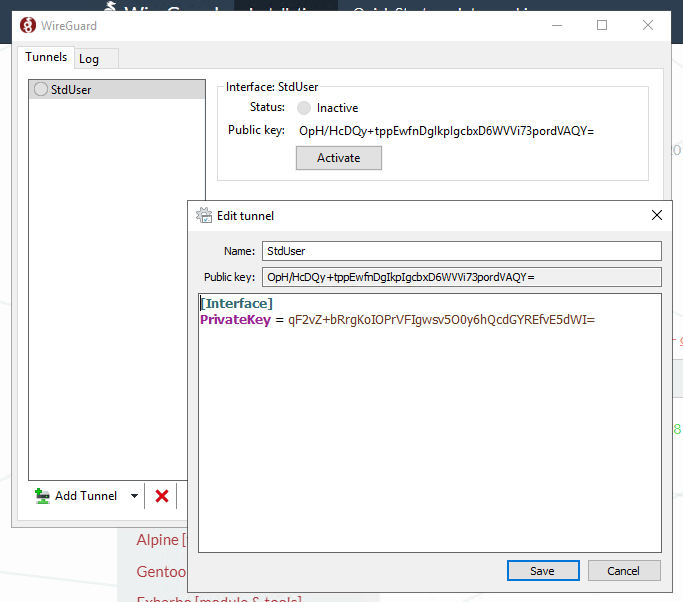
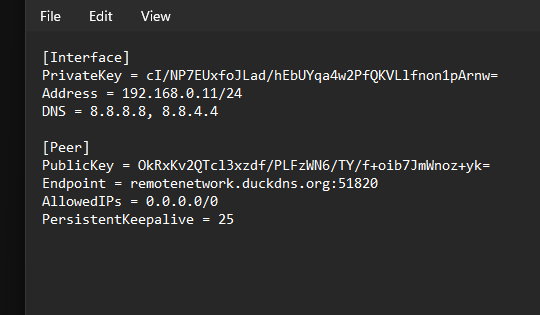
Add to this, that there is no username/password, no opportunity to require MFA, and no connectivity to an Idp such as Microsoft Azure (EntraID). Once the configuration for a user has been obtained, there is little to prevent misuse.
OpenVPN requires multiple ports, where Wireguard only needs one. It also does not have any ability to support MFA or an external Idp. Add to this overhead for a full server. Quite honestly, I was never able to actually get this solution to work. Perhaps by my own efforts.
What’s the alternative? Cloudflare and Twingate. In-fact, I use both.
Cloudflare serves to enable application access to specific services that I host, including a self-hosted bitwarden password management instance, and a Windows RDP solution, without exposting RDP itself.
Twingate is how I can permit remote network and device access using Azure AD (requiring MFA), device policies (only approved devices, and only devices with configured based paramters such as antivirus, screenlock, etc.) I use this for remote network access. I also have the opportunity to control what a given user has access too versus another user.
Both of these use a ‘connector’ that runs in docker. In my case, these run on my NAS. So on a device I am already running, I am simply running a few containers to enable remote access. I also have redundancy with this in case one of those connectors fails.
My Azure tenant requires MFA (this will work with M365 and free tenants, though free tenants do not have conditional access policies). Twingate will also work with GitHub, Google, and LinkedIn accounts for authentication.
I would not call these solutions a VPN killer. There are more robust enterprise VPN solutions that have their place. This, however, does solve remote network and device access for the average home user who may not be familiar with the security and risks of exposing access to them on the internet.
Both of these obfuscate the remote IP, so the external IP is not exposed. The remote IP for these will also change as it is used. Access can be controlled remotely by someone with administrative access, and cloudflare offers a single-click option should fear of active compromise happen. That single-click shuts down all access until the issue can be addressed.
There is a client for users to install, but zero configuration files to manage or keep secure, and no servers to manage or patch. In my opinion, this is a solid remote access solution given the ease of configuration and very low overhead involved with either of these.

 CJ on Tech
Leave a comment